
Tesla has started rolling out Full Self-Driving (FSD) v14.3.4 through software update 2026.14.6.10, bringing a long-awaited feature to the Cybertruck while also introducing several new parking-related features and interface improvements for FSD users.
Cybertruck A.S.S.
The biggest addition in the update is the long-awaited arrival of Actually Smart Summon (A.S.S.) on the Cybertruck. Tesla confirmed earlier this week that the feature was finally ready to be deployed to owners, allowing the electric pickup to navigate through parking lots and private property without a driver behind the wheel.
Cybertruck was the last vehicle in Tesla’s lineup waiting for the upgraded Summon feature, which lets owners use the Tesla app to have their vehicle drive to them or travel autonomously to a selected location in a parking lot.
New Destination Parking Options
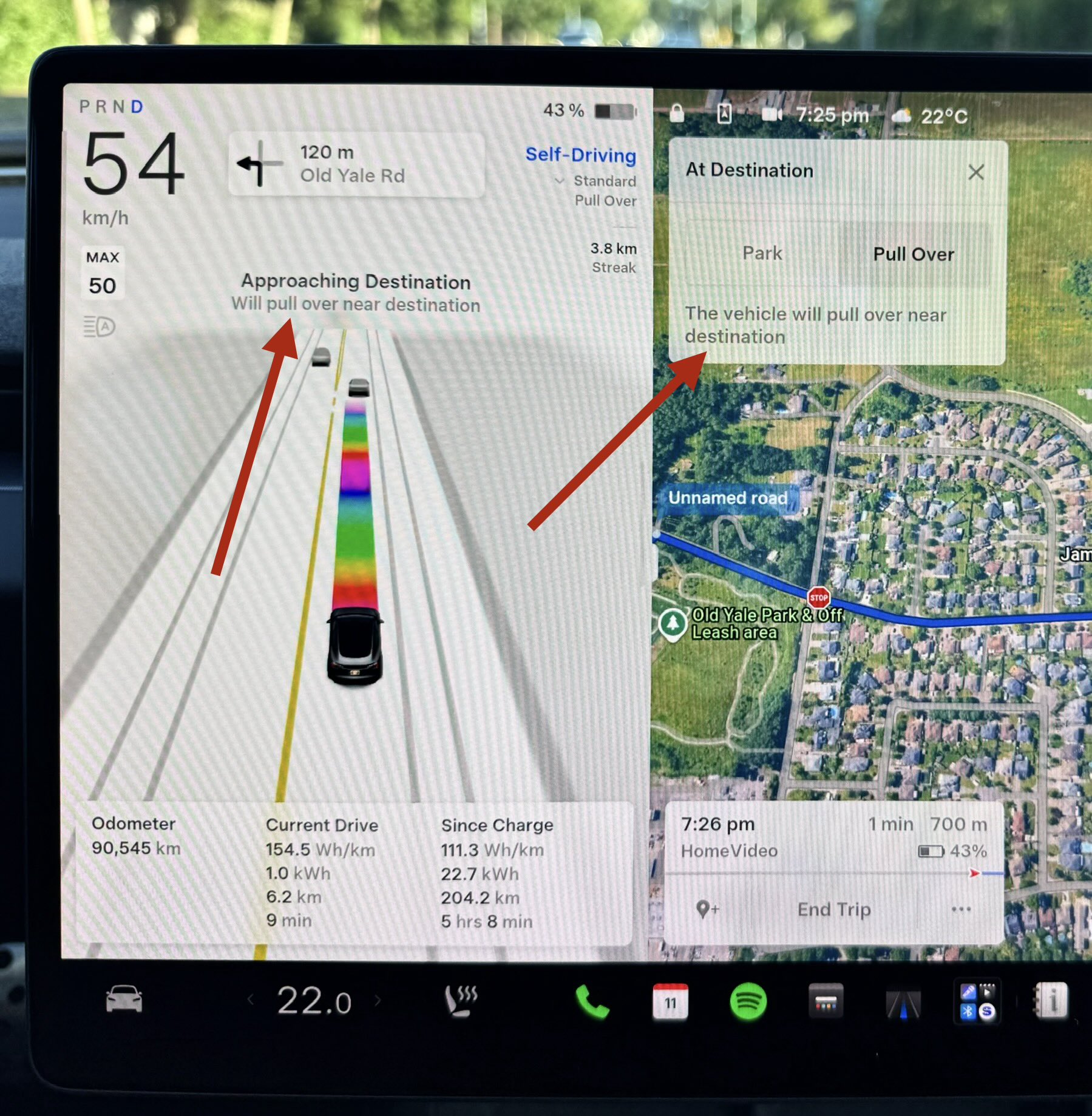
Beyond Cybertruck Summon, Tesla has also refined how FSD handles the final moments of a trip. Drivers running v14.3.4 can now choose what the vehicle should do when it reaches its destination. New controls allow owners to select either Park or Pull Over, giving FSD more flexibility depending on the destination and circumstances.
The new option appears within FSD’s Speed Profile settings and can be adjusted while driving. If Pull Over is selected, the vehicle will stop near the destination rather than searching for a parking space. Pull over is new, replacing the previous curbside option, although its unclear if it has been simply renamed or has any new capabilities.
Along with the options, Tesla has also added new notifications to make FSD’s intentions clearer. As the vehicle approaches its destination, drivers will now see messages explaining how the system plans to complete the trip, such as whether it intends to park or pull over, with drivers able to pick between the two options.
The update also adds a new shortcut that makes it easier to insert an additional stop while navigating, allowing drivers to modify a route without interrupting an active FSD trip.
While the waypoint feature itself has been around for several years, previously it was only accessible after a few taps on the screen. Now you can simply tap once on the icon to add an additional destination.
Want to add a stop on the way to your destination? Just click here on FSD 14.3.4/2026.14.6.10 pic.twitter.com/4ObJMgqu7X
— Dirty Tesla (@DirtyTesLa) June 11, 2026

Always get the latest - make Drive Tesla your preferred source on Google
Are you buying a Tesla? If you enjoy our content and we helped in your decision, use our referral link to get three months of Full Self-Driving (FSD).Drive Tesla uses affiliate links, which means we may earn a commission if you make a purchase through them, at no additional cost to you. Thank you for your support.